
Client Portal: Accounting Page
Client Portal: Accounting
Overview
The Pass the Keys Client Portal Accounting page provides a historical view of your property's financial performance. The information displayed is based on completed invoice periods and is available up to the end of the most recently invoiced period.
Tool Tips
Throughout the page, you’ll find information tooltips that provide additional detail about how figures are calculated and what is included in the information displayed.
Account Period
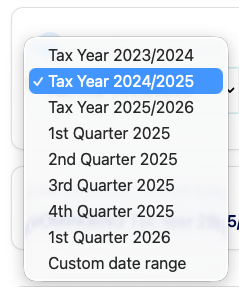
Use the Account Period dropdown to select the period you would like to review. You can choose from recent tax years, recent quarters, or create a custom date range.
You can also compare two periods to understand how your property's performance has changed over time.
The available periods will automatically update to show:
- Last 3 tax years
- Last 5 quarters
The custom date selector enables you to select a date from when your property onboarded, to the most recent invoice date.
Compare Periods
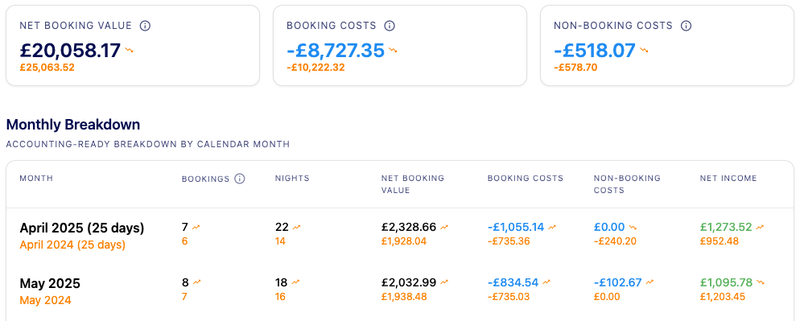
The Compare Periods feature allows you to compare two periods side by side. The primary dataset is displayed using the standard page styling, while the comparison dataset is shown beneath in yellow text. Comparison data is displayed throughout the page including the summary metrics, monthly breakdown, booking costs, non-booking costs and channel performance sections.
Period Summary
The Period Summary provides a high-level overview of your property's performance for the selected period.

- Net Income – Income retained after booking and non-booking costs have been deducted
- Booked Nights – Total nights booked during the selected period
- Available Nights – Total nights available for guests to book
Key Financial Metrics

- Net Booking Value represents revenue generated from bookings before operational costs are deducted
- Booking Costs are costs directly associated with operating your short-term rental, such as management, cleaning and consumables
- Non-Booking Costs are property-related costs and adjustments that are not directly linked to individual bookings
Monthly Breakdown
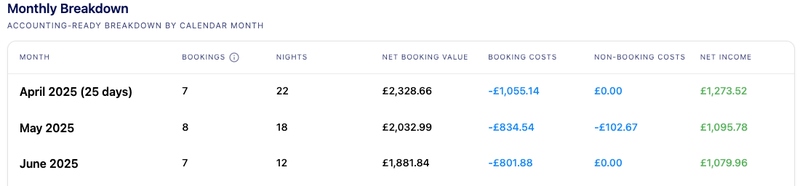
The Monthly Breakdown helps you understand seasonal trends, compare performance month-to-month, and identify how costs and income change throughout the year.
This gives you an overview of income and expenses by month. Where are part month is displayed, we include the number of days in the month included. For example, when viewing the UK tax year, we show the number of days in April included in the data, to reflect the tax year starting on 6th.
Booking Costs Breakdown
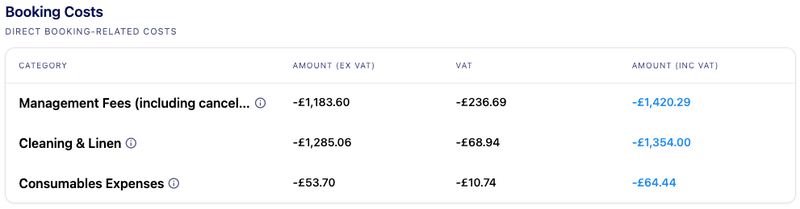
The Booking Costs section shows the costs directly associated with hosting guests at your property. These costs will typically increase or decrease in line with booking activity.
Typical booking costs include:
- Management Fees – Fees for managing and marketing your property, guest communications, bookings and day-to-day operations.
- Cleaning & Linen – Costs for cleaning and preparing the property between guest stays.
- Consumables – Guest supplies and household essentials provided at the property.
Where can I find more information?
For a detailed breakdown of booking costs, you can see more detail on the Bookings & Performance Page, where we now detail that costs for each booking.
Non-Booking Costs
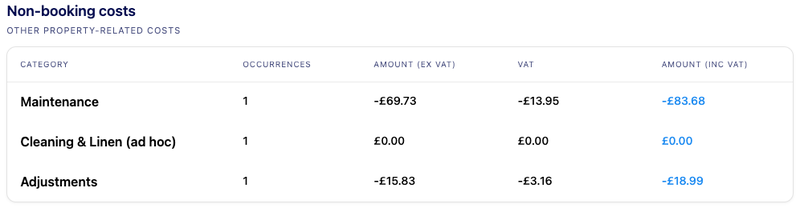
Non-booking costs are property-related expenses that are not directly linked to a guest booking. These costs may be incurred regardless of occupancy and are displayed separately from booking-related costs.
NB: Cleaning for homeowner stays is displayed in this section, as we don’t treat homeowner stays as a booking.
Where can I find more information?
For non-booking costs, these can be found on the Activities page, including details of the cost, time spent undertaking the task and any notes added to the activity.
Channel Performance
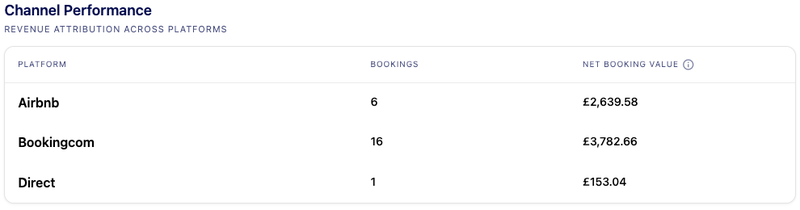
Channel Performance shows where your bookings and revenue are coming from, helping you understand how your property is being marketed across booking channels.
Frequently Asked Questions
Accounting Page FAQs
Net Income includes both booking and non-booking costs, while Net Booking Value represents booking revenue before costs are deducted.
We will introduce an export feature in Q3 2026, which will include the data required to complete the Make Tax Digital and end of year accounts.