
Client Portal: Activities Page
Client Portal: Activities
Overview
The Activities page provides visibility into the work being carried out to support and manage your property. It displays operational, guest, maintenance and servicing activities, helping you understand what has been completed, who performed the work, and any associated costs.
The page is designed to provide transparency into the day-to-day management of your property and the services delivered on your behalf.
Information Tooltips
Throughout the Activities page, you'll find information tooltips next to selected figures and headings. These tooltips provide additional detail about how figures are calculated, what information is included, and how specific sections of the page should be interpreted.
Reporting Period
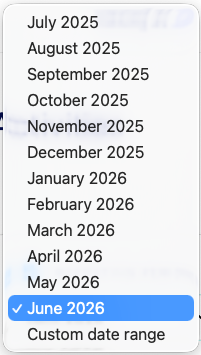
Use the Reporting Period selector to choose the period you would like to review. You can select an individual month or create a custom date range to view activities completed during a specific period.
Activity Summary

- Guest Questions Answered – The number of guest enquiries and support requests handled before, during and after guest stays.
- Pricing Reviews – The number of pricing reviews completed during the selected period.
- Bookings Managed – The number of bookings managed during the selected period.
- Total Activities – The total number of activities completed during the selected period.
- Activity Costs for This Period – The total value of chargeable activities completed during the selected period.
- Total Included Activities – The number of activities completed as part of your management service.
Activity List

Below the summary cards you'll find a detailed list of activities completed during the selected period. Each activity is displayed as a separate record and can be expanded to view additional information.
Expanded Activity Details
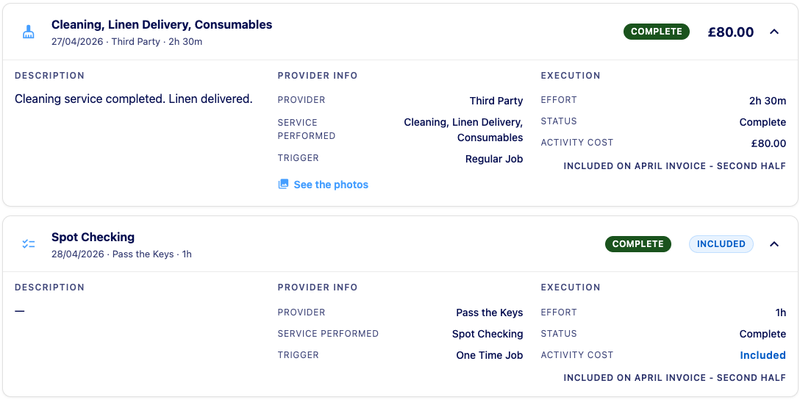
- Selecting an activity displays additional information about the work completed
- Description – A summary of the work completed
- Provider Information – Details of the person, team or third-party provider who completed the work
- Activity Triggers – Activities may be classified as Regular Services, One-Time Jobs or Repeat Jobs
- Execution Details – Time spent, status, activity cost and invoice information
Understanding Activity Costs
Activities can be classified as either Included or Chargeable
- Included Activities form part of your existing management service and do not incur an additional charge
- Chargeable Activities may incur an additional cost. Where applicable, the activity record will display the activity cost and the invoice period in which the charge will appear
For additional financial detail, you can view the Accounting page or your invoices.
Cleaning Photos Link
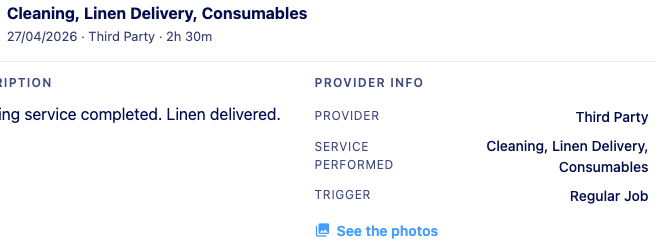
For cleaning activities, where photos have been taken, we automatically include a link to view the photos taken by the cleaning team.
Included on Invoice Label
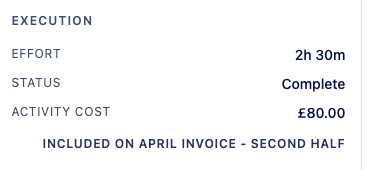
This shows which invoice the activity cost will appear on, making it easier to reconcile activity costs with your invoices.
Common Activity Types
Activities recorded on this page may include cleaning and linen supply services, linen delivery, consumables replenishment, maintenance and repairs and photography services completed on your behalf.
Frequently Asked Questions
Activities Page FAQs
Activities marked as Included are covered by your management service. Activities displaying a cost represent chargeable services, third-party work or optional services completed on your behalf.
Third Party indicates that the work was completed by an external supplier or contractor.
Activities display the invoice period in which the cost will be included.
Total Activities represents all recorded activities completed during the selected reporting period.