
Client Portal: Dashboard
Client Portal: Dashboard
Overview
The Dashboard is the first page you see when you log in to the Client Portal. It gives you a quick overview of your property, bringing together upcoming calendar activity, performance, bookings, guest reviews, recent work at your property, quarterly reviews and property photos in one place.
Each tile on the Dashboard is a shortcut. Select a tile to go straight to the page that holds the full detail.
Some tiles only appear once your property is operational. As your property starts taking bookings and receiving guest feedback, the relevant tiles are added automatically.
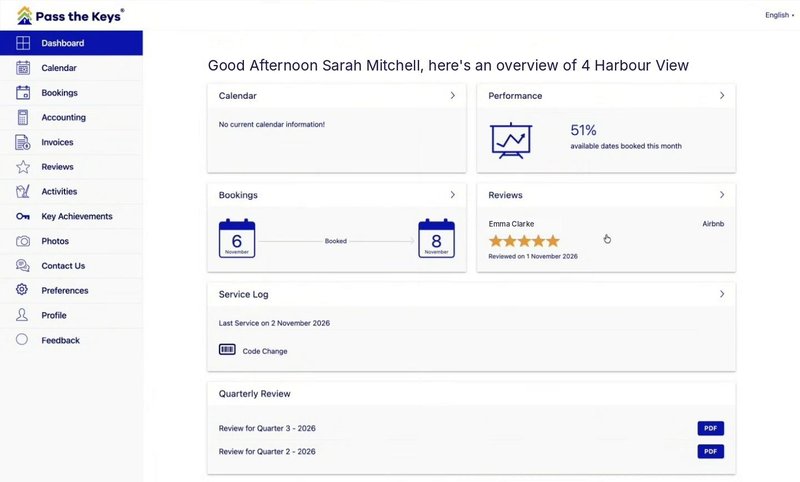
Dashboard Tiles
Calendar
Shows any upcoming calendar information, such as a booking or blocked dates coming up. Select the tile to open the Calendar page.
Performance
Shows a headline performance figure, such as the percentage of available dates booked this month. Select the tile to open the Bookings page.
Bookings
Shows a snapshot of either the current booking or the next booking, with its arrival and departure dates.
Reviews
Shows your latest Airbnb review, including the star rating and the date it was left. Select the tile to open the Reviews page, where you can see all of your reviews.
Service Log
Shows the most recent activity carried out at your property, such as a key code change, along with the date of the last service. Select the tile to open the Activities page.
Quarterly Review
Lists up to your last three quarterly reviews. Select PDF next to any review to open and download it.
Photos
Shows a preview of your property photos. Select View all to open the Photos page.
Onboarding Checklist on the Dashboard
While your property is still being onboarded, you will also see the Onboarding Checklist. This disappears once the checklist has been submitted and accepted. See the Onboarding Checklist guide for more detail.
Frequently Asked Questions
Dashboard FAQs
Some tiles only appear once your property is operational. As soon as your property starts taking bookings and receiving reviews, these tiles will appear.
The Reviews tile and Reviews page currently show reviews left on Airbnb.
The Dashboard shows up to your last three quarterly reviews. If you need an older review, please contact your local Pass the Keys team.