
Client Portal: Photos Page
Client Portal: Photos
Overview
Every time your property is cleaned, we take photos and upload them to the Photos page. This gives you peace of mind that your property is being looked after, wherever you are.
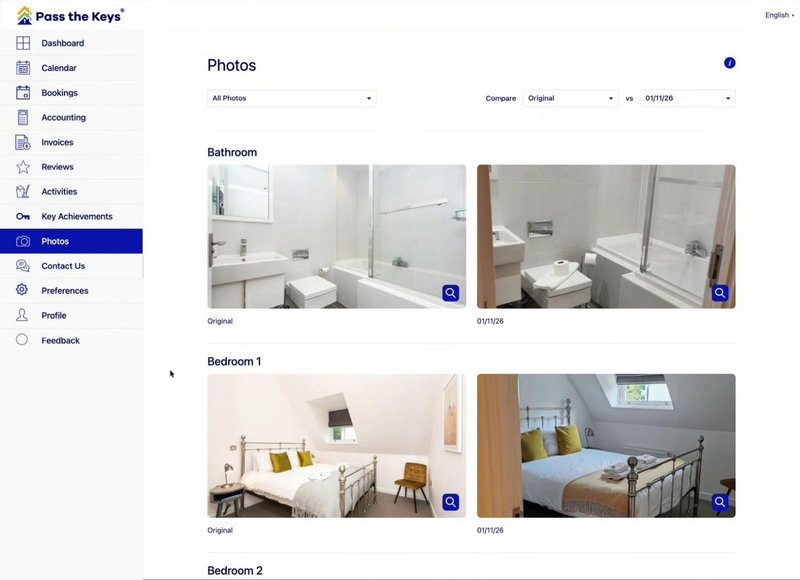
The Photos page shows the original photos of each room side by side with photos from a clean, so you can compare the condition of your property over time.
Comparing Photos
Photos are grouped by room, such as Bathroom and Bedroom 1.
Original (left): The photos taken when your property was onboarded. These are often the photos used for your listing.
Clean photos (right): The photos taken at a clean, labelled with the date of the clean. The latest clean is shown by default.
Select the magnifying glass on any photo to view it in more detail.
Filtering Photos
Compare: Choose which photos to compare, using the date dropdowns to go back through every clean where photos were taken.
Room or photo filter: Use the All Photos dropdown to focus on a particular room or photo.
NB: Not all of our suppliers have a smartphone that is compatible with our app, so photos from some cleans may not be available in the Client Portal. We are working to improve this, so over time you will be able to view photos from all cleans.
Frequently Asked Questions
Photos Page FAQs
Photos are taken during cleans and added to the Photos page for that date.
Not all of our suppliers currently use a smartphone that is compatible with our app, so some cleans may not have photos in the Client Portal.
These were taken when your property was onboarded with Pass the Keys, and are often the photos used on your listing.