
Client Portal: Profile Page
Client Portal: Profile
Overview
The Profile page holds your account details and settings. You can check your personal details and the terms you signed up to, change your password, choose your preferred language, and decide which email notifications you receive, including alerts for new bookings.
Account Details
The top of the page shows your name, the number of properties you are renting out, and your contact and account details, including:
Contact details: Telephone, email address and address.
Business details: Business name and tax identification number, where relevant.
Terms of Service: The date your terms were last updated.
Direct Debit status: Whether your Direct Debit is set up.
Select 'Change Password' to update your password.
If you have more than one property
If you have more than one property, you will see an additional option at the top of the menu to choose which property you want to view. The rest of the menu then shows the pages for that property.
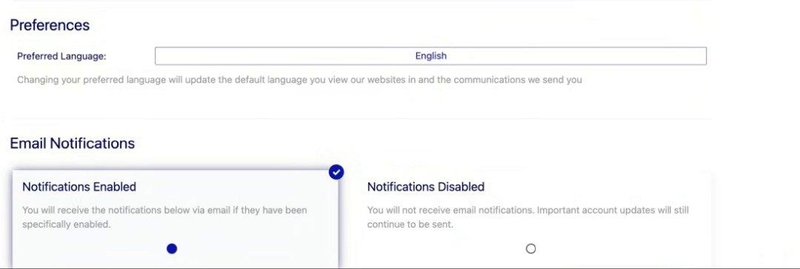
Preferred Language
Choose English or Spanish. Changing your preferred language updates the default language used on our websites and in the communications we send you. You can also change the language using the selector in the top right corner of the Client Portal.
Email Notifications
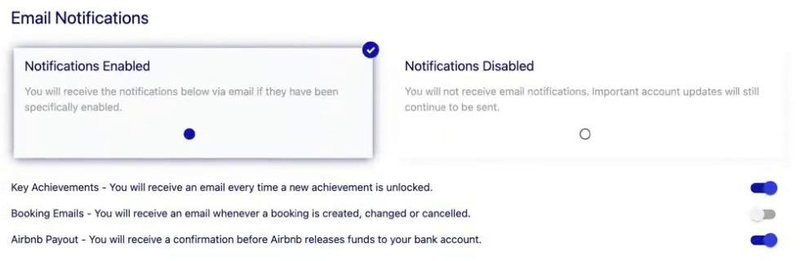
Choose Notifications Enabled or Notifications Disabled. With notifications disabled, important account updates will still be sent.
With notifications enabled, you can switch individual notifications on or off:
Key Achievements: An email every time a new achievement is unlocked.
Booking Emails: An email whenever a booking is created, changed or cancelled.
Airbnb Payout: A confirmation before Airbnb releases funds to your bank account.
Select 'Save' to keep your changes.
Your Key Terms
At the bottom of the page, you can see a summary of the key terms you signed up to for each property, such as the services provided, management fee, service provider, cancellation rights, minimum term and notice period. Select view full Terms & Conditions to read them in full.
Feedback
You can share feedback with us at any time using the feedback form.
Frequently Asked Questions
Profile Page FAQs
Go to your Profile page, make sure Notifications Enabled is selected, switch on Booking Emails and select Save. You will also be emailed when a booking is changed or cancelled.
No. Important account updates will still be sent even if notifications are disabled.
Choose English or Spanish under Preferred Language on your Profile page, or use the language selector in the top right corner.
Your Key Terms, at the bottom of your Profile page, summarises the terms you signed up to. Select view full Terms & Conditions to read them in full.